
MyClevelandClinic®
Cleveland ClinicMedical
4.3283.00 Reviews
- Version
- 11.8.3
- Installs
- 100.00K
- Age Rating
- Everyone
Screenshots
Our Review of MyClevelandClinic®
 Analysis by Appyee
When I open a medical app, I am not looking for entertainment or a long list of extras. I want a clear way to reach the parts of my healthcare record that matter, without having to search through old messages or make a phone call for every small question. That is the role MyClevelandClinic® appears designed to fill. It is a free medical app from Cleveland Clinic that connects patients with portions of their medical record, and its value depends less on flashy presentation than on whether it helps me handle healthcare tasks with confidence.
My first impression is that this is best understood as a patient-access tool rather than a replacement for a doctor, an emergency service, or a complete personal health-management system. That distinction is important. An app connected to medical information deserves a more careful review than an ordinary utility because the experience involves private details, account access, and decisions that can affect real treatment. I therefore look at it through two lenses: how useful it is in everyday situations and how much control the user appears to have over the experience.
How MyClevelandClinic® fits into everyday healthcare
Cleveland Clinic is the developer, and the app belongs to the medical category. It has been available since November 13, 2019, with version 11.8.3 currently identified for the app. The service is rated for Everyone, which makes sense for a patient-facing healthcare application, although the information shown inside an account can naturally be personal and sensitive even when the age classification is broad.
The app has an average rating of 4.3 from around 794 ratings, and it has passed 100 thousand installs. Those figures suggest that it has reached a meaningful group of users, but I would not treat popularity as proof that it will suit every patient. A medical app can be useful for someone already receiving care through Cleveland Clinic while offering very little to a person whose providers and records are elsewhere.
The most important practical question is whether I am already part of the Cleveland Clinic patient environment. If I am, having a mobile route into relevant record information can be more convenient than relying on paper documents, desktop access, or repeated calls to a clinic. If I am not connected to Cleveland Clinic care, the app is unlikely to become a universal health organizer simply because it is installed on my phone. Its usefulness is tied closely to the healthcare relationship behind it.
That makes the app different from a general symptom checker, medication reminder, fitness tracker, or standalone medical notebook. Those tools usually begin with information I enter myself. MyClevelandClinic® is centered on access to information associated with patient care. For me, that is both its strongest reason to use it and its clearest boundary.
The trust question starts before the first screen
With any patient-record application, trust should not be reduced to a polished interface. I want to know which account I am entering, what information is visible, and whether the app keeps me aware of the difference between viewing a record and taking a medical action. The store summary explains that the app connects patients to portions of their medical record. The word “portions” matters: I should not assume that every document, historical detail, or outside-provider record will appear in one place.
That expectation protects against a common mistake. If I open the app and do not see a particular result or older document, I should not immediately conclude that the information does not exist or that my care team has ignored it. A patient portal reflects the information made available through its connected system. For complex care involving several organizations, I would still keep direct contact with the relevant clinic and retain important instructions in a separate, reliable place.
I also appreciate that the app is free. There is no purchase decision standing between a patient and the basic download. Still, “free” does not mean the service should be treated casually. The real exchange is access to a healthcare account and personal medical information, so I would install it only on a device I control and would avoid treating a shared phone as private by default.
What account control means in practice
The most useful control is not a decorative setting; it is the ability to decide when and where I access sensitive information. I would begin by checking that the application comes from Cleveland Clinic and that I am signing into the correct patient account. I would also review the device’s own security options before using the app regularly. A strong screen lock, updated operating system, and care around notifications are simple steps, but they matter more here than they do with an ordinary shopping or weather app.
I would be especially careful with a phone that other family members borrow. Even if the app itself requires account access, notifications or an already-open session could reveal more than I intended. My practical habit would be to sign out when the device is shared, avoid discussing private results in public, and inspect the phone’s notification settings so that sensitive text is not displayed on a lock screen.
The current minimum operating system is 11. That is helpful for compatibility planning: before installing, I would check the phone’s software version rather than assume every older device can run it. This is also a trust issue in a quiet way. A device that no longer receives security updates may be a poor place for medical-account access, even if the app technically opens.
I would not confuse the ability to view record information with permission to change treatment independently. Medical records can contain results, notes, and instructions that need professional context. If something looks urgent, contradictory, or unclear, the sensible next step is to contact the appropriate healthcare service rather than relying on an app screen to interpret it.
Sensitive moments where a little preparation helps
The app could be most useful when I need to prepare for an appointment. Instead of trying to remember every recent interaction, I can use the available record information as a prompt for questions: What changed since the last visit? Which result do I not understand? Is there an instruction I should confirm? This turns the phone into a preparation aid rather than a substitute for conversation.
A realistic example would be a patient who receives a new result shortly before a scheduled visit. Opening the app on a private connection, reading the information carefully, and writing down questions can make the appointment more focused. I would not forward a screenshot casually, because a screenshot may include identifiers or surrounding details that the recipient does not need. If information must be shared, I would use the healthcare channel intended for that purpose whenever possible.
Another useful situation is after a visit, when I am trying to remember what was discussed. The app may help me return to the portions of the record made available through Cleveland Clinic, but I would still compare what I see with the printed or spoken instructions I received. Medical language can be easy to misread when I am tired or anxious. A record-access app improves access; it does not remove the need for interpretation.
Travel creates a similar trade-off. Having relevant information accessible on a phone can be more practical than carrying a folder of papers, but I would not assume that every outside clinician can view the same record through my app. Before traveling, I would save only the information I genuinely need, keep emergency contacts available separately, and confirm how to reach my care team if the app is unavailable.
For caregivers, the question becomes even more sensitive. A family member may help someone manage appointments or understand instructions, but sharing a password or leaving an account open can create avoidable risk. I would prefer an official account arrangement or clearly authorized process over informal credential sharing. If the person receiving care can manage access themselves, their choices should remain central.
Where the app is stronger than familiar alternatives
Compared with a paper folder, mobile access is more convenient when I need information away from home. Compared with calling a clinic for every routine question, a patient portal can reduce friction by letting me check what is already available at a time that suits me. Compared with a general health app, the connection to Cleveland Clinic care gives the information a more direct relationship to my treatment experience.
That advantage is also narrower than the promise of a universal record vault. A general health organizer may be better for manually combining information from several hospitals, tracking personal measurements, or keeping a long-term journal. A medication app may offer a more focused reminder workflow. A direct call may be better when I need immediate clarification, when a record entry seems wrong, or when the matter is urgent.
I would therefore choose this app according to the source of my care. For a Cleveland Clinic patient who wants convenient access to connected record information, it is a logical first choice. For someone managing records across unrelated providers, I would treat it as one piece of the picture rather than the only place to look. That is not a flaw unique to this app; it is a limitation of provider-specific portals generally.
Data-sensitive habits I would use
My first habit would be to avoid logging in over an untrusted public network when I can wait for a safer connection. My second would be to check the account after installing an update, not because an update is automatically suspicious, but because changes in layout can move controls or alter how information is presented. I would also keep the app and the phone’s operating system current when the device supports them.
I would never use a medical record as a casual note-sharing tool. Copying a result into a group chat, taking a screenshot for convenience, or leaving the app open on a desk can expose more information than intended. If I need to remember something, I would write down the question rather than duplicate the entire record. This is a small but meaningful way to preserve control after information leaves the app.
I would also separate three different situations: routine viewing, confusing information, and urgent symptoms. Routine viewing is where the app is most comfortable. Confusing information calls for a clinician or support channel. Urgent symptoms call for immediate medical help, not a search through a portal. Keeping those categories separate prevents the convenience of mobile access from becoming false reassurance.
Who should use it, and who should look elsewhere?
I would recommend trying MyClevelandClinic® to a current Cleveland Clinic patient who wants a more convenient way to reach available record information from a mobile device. It may also suit a person preparing for appointments, reviewing recent care, or trying to keep healthcare tasks organized without carrying paperwork everywhere.
I would be more cautious about recommending it as the main solution for someone whose care is spread across several unrelated systems. That person may need a broader record-management approach, direct access to other provider portals, or a carefully maintained personal file. I would also suggest another route for anyone seeking diagnosis from symptoms, continuous wellness tracking, or emergency guidance. Those are different jobs.
People using an older phone should check the operating-system requirement before planning around the app. People who share a device should think through account and notification privacy first. And anyone uncomfortable with digital medical accounts may prefer speaking directly with the provider while learning the portal gradually, rather than feeling pressured to move every healthcare task onto a phone.
My cautious verdict
MyClevelandClinic® makes sense when the need is specific: convenient mobile access to portions of a Cleveland Clinic medical record. I like that its purpose is practical rather than distracting, and the free price removes one common barrier to trying it. Its rating of 4.3 and reach of over 100 thousand installs show that it has an established audience, though my decision would still depend mainly on whether Cleveland Clinic is part of my care.
The app earns trust for me when I treat it as a controlled doorway, not as an all-purpose medical authority. I would protect the device, manage notifications, avoid sharing credentials, and remember that a visible record is not necessarily a complete record. Those habits are not optional extras; they are part of using a patient portal responsibly.
My final recommendation is careful but positive. If I already receive care through Cleveland Clinic and want record access in a mobile format, I would install it and use it as an appointment-preparation and information-review tool. I would not rely on it for emergencies, assume it contains every provider’s information, or use it instead of asking a professional when something is unclear. The best reason to use this app is controlled access to relevant care information, not the illusion that a phone can replace the healthcare relationship.
Verdict
Strengths of MyClevelandClinic®
- Secure access to appointments, test results, prescriptions, and medical records.
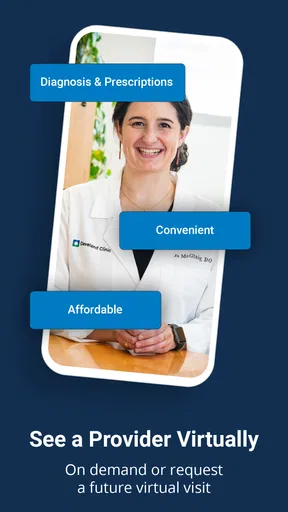
- Offers convenient virtual visits and messaging with Cleveland Clinic care teams.
- Prescription refill requests and medication details are easy to manage.
- Helps users track upcoming appointments, reminders, and care instructions.
- Supports health management without needing to call the clinic for every update.
Limitations of MyClevelandClinic®
- Most features are limited to Cleveland Clinic patients with an active account.
- Some results or records may appear only after provider review and release.
- Virtual care availability can vary by location, specialty, and appointment type.
- The app may require frequent updates and a reliable internet connection.
- Some users may find the interface overwhelming when managing complex health data.
Similar Picks in This Category
View All
WebMD: Symptom Checker
WebMD, LLC4.1

Microphone Amplifier
DOSA Apps4.2

Anatomy Learning - 3D Anatomy
3D Medical OU4.5

Period Tracker and Calendar
SimpleInnovation4.9

GoodRx: Prescription Coupons
GoodRx4.8

CVS Health
CVS Pharmacy4.5
Frequently Asked Questions
What is MyClevelandClinic® and what can I use it for?
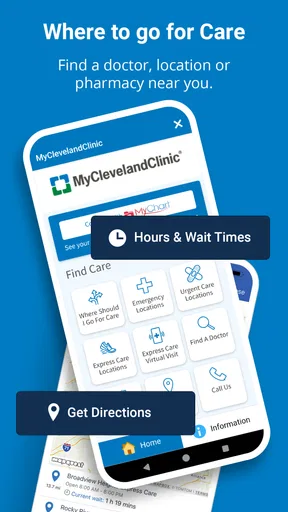
MyClevelandClinic® is Cleveland Clinic’s official patient portal app for managing many healthcare tasks from an Android or iOS device. After signing in, eligible patients can review portions of their medical record, see test results, manage appointments, communicate with care teams, request prescription refills, review billing information, and access educational resources. Available features may vary depending on your location, provider, and account status.
How do I sign in or create a MyClevelandClinic® account?
You generally sign in using your Cleveland Clinic patient portal credentials. If you are a new user, the app may guide you through account activation using information provided by Cleveland Clinic, such as an activation code or identity verification details. Some services can also support sign-in options such as biometric authentication after setup. If you cannot access your account, use the official recovery tools or contact Cleveland Clinic support.
Can I schedule appointments and communicate with my doctor through the app?
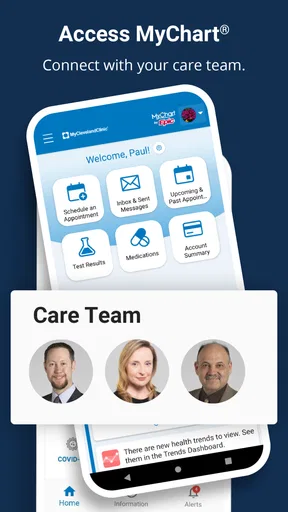
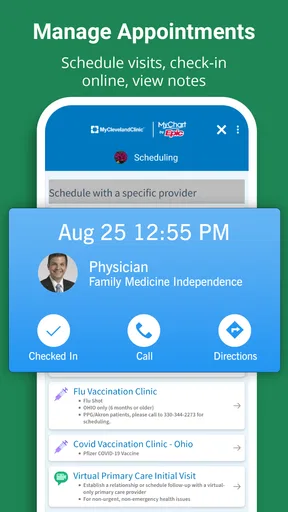
For participating Cleveland Clinic departments and providers, MyClevelandClinic® can make appointment management more convenient. Depending on your care relationship, you may be able to request or schedule visits, view upcoming appointments, receive reminders, and send secure messages to your healthcare team. Not every appointment type is available online, and urgent symptoms should not be handled through messaging; contact emergency services or your provider directly when immediate care is needed.
Can I view test results, prescriptions, and medical records in MyClevelandClinic®?
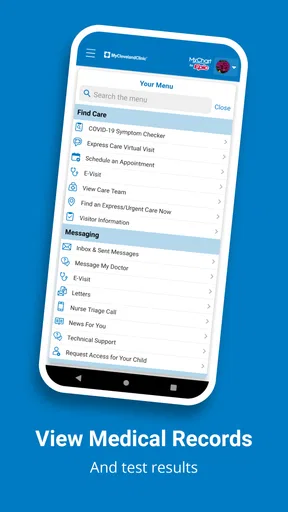
The app can provide access to selected health information connected to your Cleveland Clinic patient account, including laboratory and imaging results, visit summaries, medications, allergies, immunizations, and other record sections. Results may appear as soon as they are released, sometimes before a clinician has reviewed them, and certain information may be delayed or unavailable. Prescription refill requests and medication details also depend on the provider and pharmacy.
Is MyClevelandClinic® free, secure, and available to everyone?
Downloading MyClevelandClinic® is generally free, although normal mobile data charges may apply and healthcare services themselves can involve costs. The app uses account security measures and protected access, but you should still use a strong password, enable device locking or biometric login, and avoid accessing your account on shared devices. Availability is primarily intended for Cleveland Clinic patients and may differ by region, age, and supported services.
